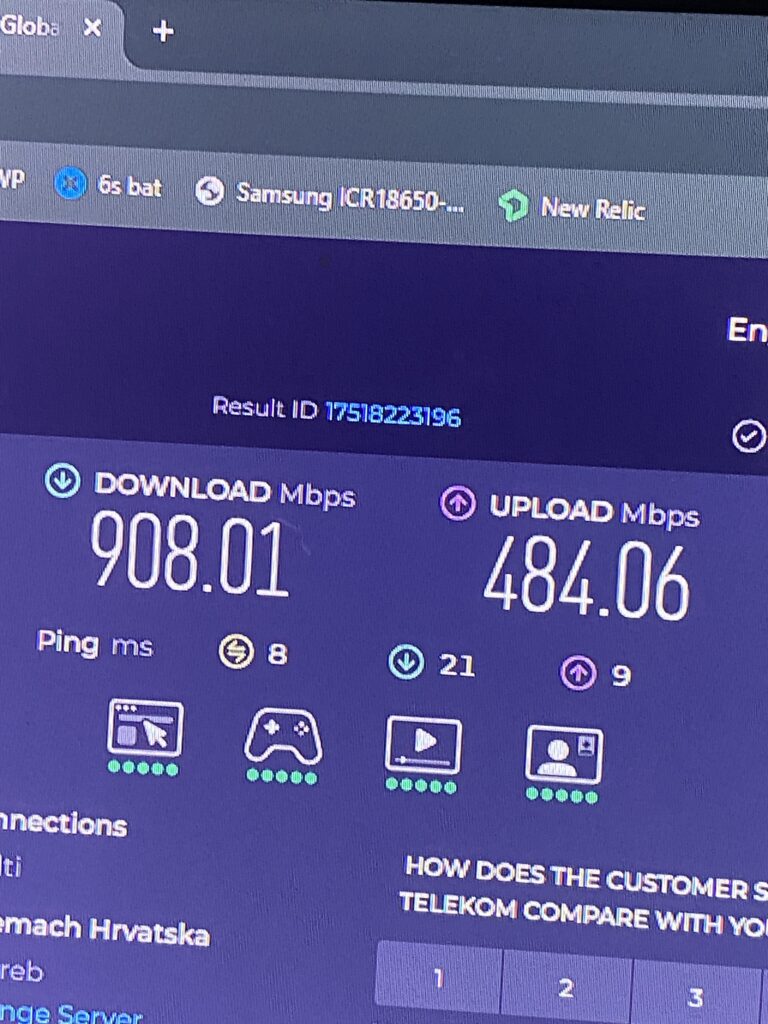
Might be interesting to some – I’m now on my 3rd ISP (4 with the old DSL) and can compare pretty well i guess.
My village has around 100 people but every house has GPON fiber so we get 1000/500Mbit (up to 2000/1000 on Telemach and RUNE) – Unthinkable in Germany or Austria.
Ironically the commie blocks and city houses often only get DSL as they have underground power (our fiber runs along the power lines) while even the smallest villages get fiber…. my flat in the city had not even a phone line for DSL but a cell tower on the roof….
ISPs:
ISKON – 300/100Mbit only, first ISP we had, quality ok but nothing special. Around 30EUR/mo.
A1 – 1000/500Mbit, we changed to them from ISKON, very good network quality but they raise prices all few Months so we cancelled. 50EUR/mo.
Telemach – 1000/500Mbit, Known from other countries and owns many smaller ISPs especially in balkan area. We already have mobile contracts with them so we get a better price. 40EUR/mo with Premium TV (all).
All fiber infra is provided by the incumbent Hrvatski Telekom and the ISPs just rent from the GPON endpoint to the enduser (around 10EUR/mo) – This seems to work well as you can just change ISP by changing your router, no need for a new media converter or fiber.
I had some time and went to Trsat (an upper area of Rijeka) to the church park to try out my setup – overall i am pretty happy what one can get between Temu, AliExpress and eBay. Total cost with the Powerbanks probably 250€. Not too heavy in backpack either.
For now i carry 2 20000Mah (..at 3.7V, at 5V 15k, 12V 6Ah – ca. 75Wh) Powerbanks which i use with 5V to 12V USB dongles (9V for the white lights) and 12V PD trigger modules. As backup i have a heavy 12V lead acid 9Ah, 6Ah usable – (60%~, also 75Wh) that i could carry also around (and a solar controller and a 40W panel, but that all needs a car then).
Croatia requires you to register domains with your unique resident/citizen number but whois data is not public. The data is verified but rarely; OIBs are automatically verified and the address of the owner is supposed to be verified within the next few months – i submitted a digitally signed proof of residence as i have no Croatian ID card. Still waiting for reply.
Generally HR Domains are very expensive at 60€+ and only available to EU businesses with EU VAT ID (limit 10 domains) and Croatian Businesses/Residents with ID number (no limits), this means a lot are still unused and is also how i grabbed william.hr
“Impressum” wise there are zero requirements – a contact method is recommended (email mostly) but there is no need to publish your real name, address and other funky stuff like in DE/AT.
After some research i know the protocols used now (rather public anyway), i just need to get my hands on a dev firmware – for usage on a stock ROM i dont need much besides external APKs enabled (or so i hope..)
Dev hardware is sadly hard to come by.
Pinout:
+3.3V: Power supply (Fused 3.3V DC Regulated) V_BAT: Unfused Main battery voltage from the phone (3.7V to 4.4V) ID: Identifies the connected Moto Mod MOD_RESET: Reset line for the Moto Mod USB_D+: USB data positive line USB_D-: USB data negative line I2C_SDA: I2C data line I2C_SCL: I2C clock line VBUS: USB power input SPI_MOSI: SPI master output, slave input SPI_MISO: SPI master input, slave output SPI_CLK: SPI clock SPI_CS: SPI chip select AUX1: Auxiliary line for custom use AUX2: Auxiliary line for custom use
The aux lines are not documented much, i need to see – for now i spectrum analyze my hasselblad camera and JBL speaker and see what i get out of that.
Both enable high-speed data transfer but have significant differences in performance, compatibility, and use cases. This post explores the differences and has a take on which interface is best suited for specific applications.
I looked into it as i want an external solution for my 2016 Macbook Pro, both to test PCIe cards as well as for eGPU use.
Interface Standards
OCuLink
Direct PCIe connectivity with minimal overhead.
Uses SFF-8611 or SFF-8612 connectors which are more bulky.
Supports PCIe Gen3, Gen4, and Gen5, offering raw speeds up to 64 GT/s (PCIe Gen5 x4) (depends on cable and distance).
Most common are x1 from miniPCIe/m.2 and x4 from m.2/PCIe.
Cales support 4 lanes each and docks may use multiple up to x16 (4 cables).
Lower latency compared to Thunderbolt due to the lack of protocol conversion.
Less widespread in consumer devices but common in industrial, server, and storage applications.
Cheap PCIe cards, external docks and cables available.
Thunderbolt 3 & 4 (+USB4)
Uses USB-C (Thunderbolt 3 and 4) and supports power delivery (up to 240W)
Supports up to 40 Gbps bandwidth, but this is shared between PCIe, DisplayPort, and other data streams.
Requires protocol conversion, adding latency compared to a direct PCIe connection.
Wide compatibility with Linux, macOS and Windows devices.